
Palmata turns an AEO assessment into questions, sources and content actions. Here is what I found when I tried it with Bamsoo (which was just recreated through MCP/Wordpress) after Dreamforce.
In my Dreamforce recap, I put Palmata in the “Get Known” part of the marketing funnel. The idea is straightforward: when a potential customer asks an AI for advice, we want to understand whether our brand appears and how it is described.
So I signed up for the Free Demo Account and tried it with Bamsoo.
The interesting part starts after the first charts. You can open the questions behind the results, read the answers, inspect their sources, and work through recommendations for improving your content. There is enough here to turn a broad concern about AI visibility into a concrete marketing task.
Let’s walk through it.
First, what are we measuring?
AEO means Answer Engine Optimization: improving how your brand and content appear in AI-generated answers. For a Salesforce consultancy, that might mean appearing when someone asks how to plan a Marketing Cloud Next migration or which partner suits a small B2B operations team.
Palmata researches the brand and its market, then builds buyer-style questions for its audit. These are test conversations, not a feed of real customer chats. The results tell you what happened across that audit’s questions; they are not a measure of your share of every AI conversation. How Palmata works
Getting started is accessible. Palmata’s documentation says signup automatically starts a first report. For later reports, you can specify a brand, its domains and optional instructions to focus the research. The free plan uses a starting credit balance; new reports and reruns consume credits. Check the current allowance rather than assuming unlimited audits.
The Bamsoo report used here was last run today. It contains 15 topics, 450 prompts and 16 recommended actions.
Brand Perception: read the three numbers together
The opening view separates three questions: does the answer mention Bamsoo, does it cite one of our pages, and is its assessment positive? That separation helps decide what to investigate next
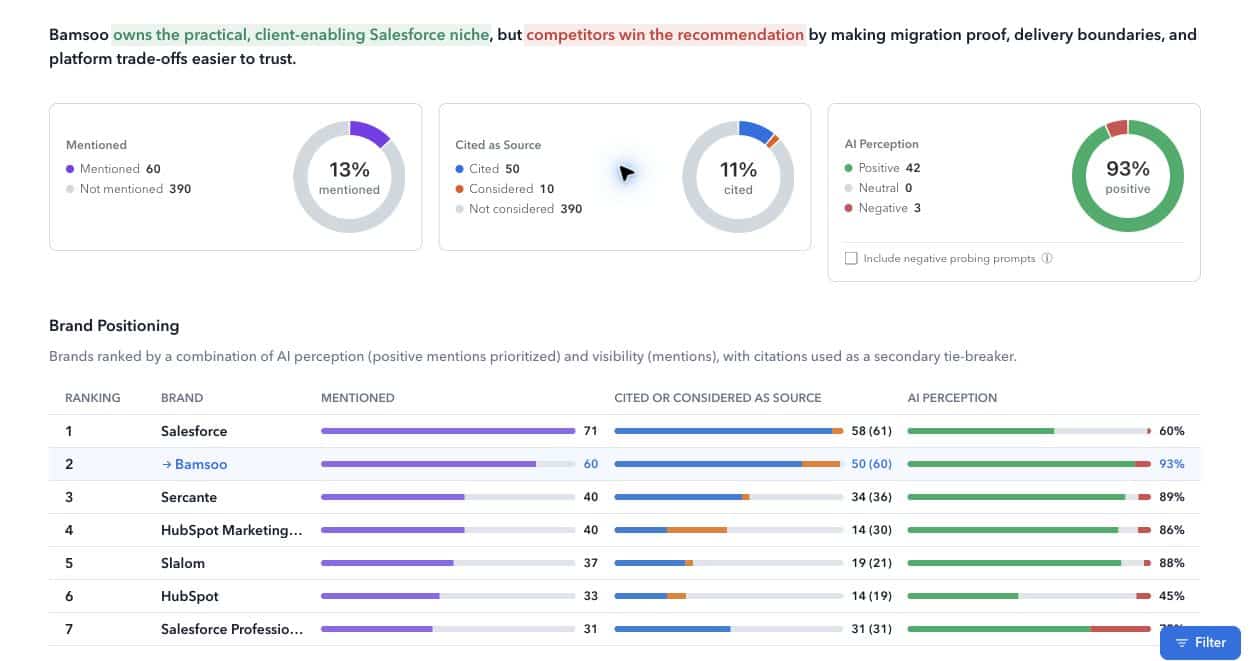
In our report, Bamsoo was mentioned in 60 of 450 prompts, rounded to 13%, and its pages were cited in 50, rounded to 11%. The citation chart also separates ten cases where our content was considered without being cited.
Positive perception needs a little more attention. With “Include negative probing prompts” unchecked, the view shows 42 positive and three negative results: 93% positive. Including those probes gives 42 positive and 18 negative results: 70% positive, matching the report-list card.
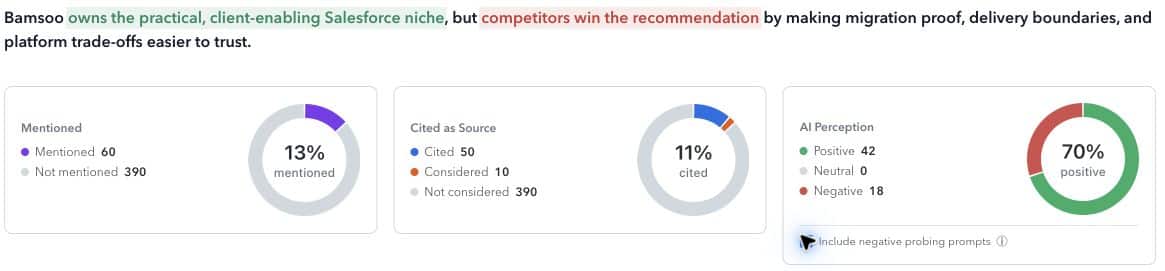
My reading: Bamsoo makes a good impression in many answers where it appears, but there are plenty of questions where it does not appear at all. That gives us a more useful starting point than celebrating a positive-perception percentage on its own.
Topics & Prompts: find the buying situation you are missing
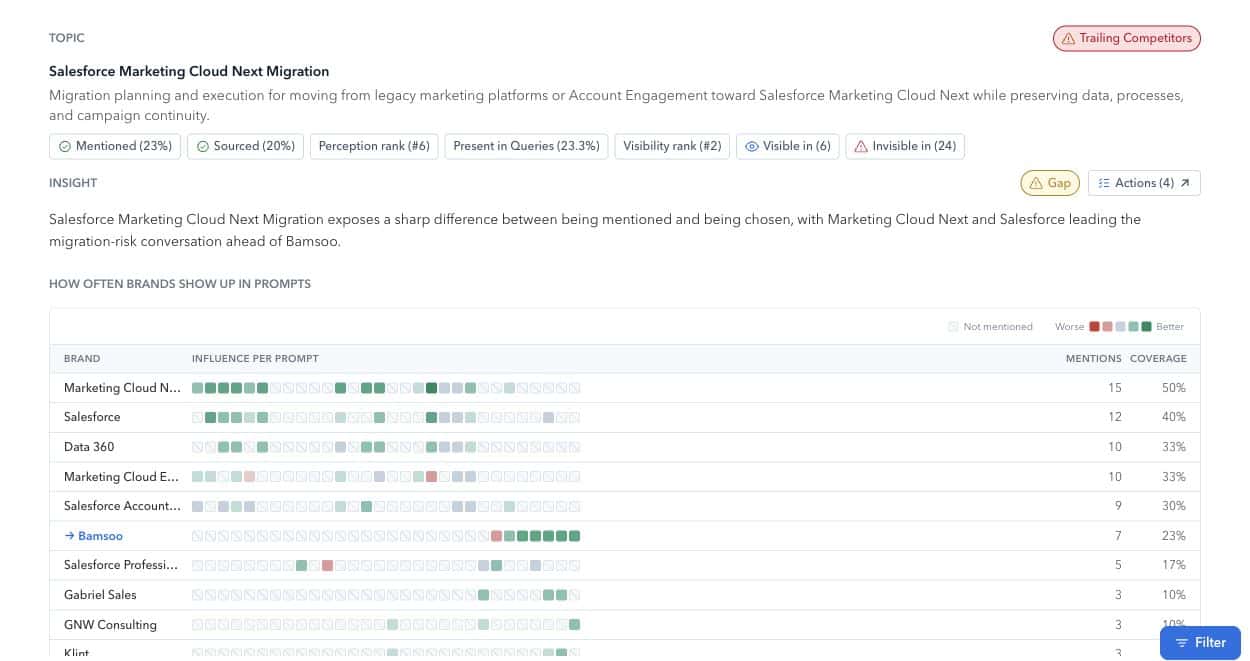
The topic view brings those 450 questions into manageable groups. Open a topic and you get a heatmap showing how different brands appear across its prompts. You can then drill into an individual question, its complete answer and its supporting sources. Topics & Prompts
I opened Salesforce Marketing Cloud Next Migration. Bamsoo appears in seven of the topic’s 30 prompts, or about 23%.
One question asks how to plan a Marketing Cloud Next migration from a legacy marketing automation platform. In that recorded answer, Bamsoo is absent. The evidence panel shows seven cited sources out of 16 considered, with Salesforce resources supporting the answer.
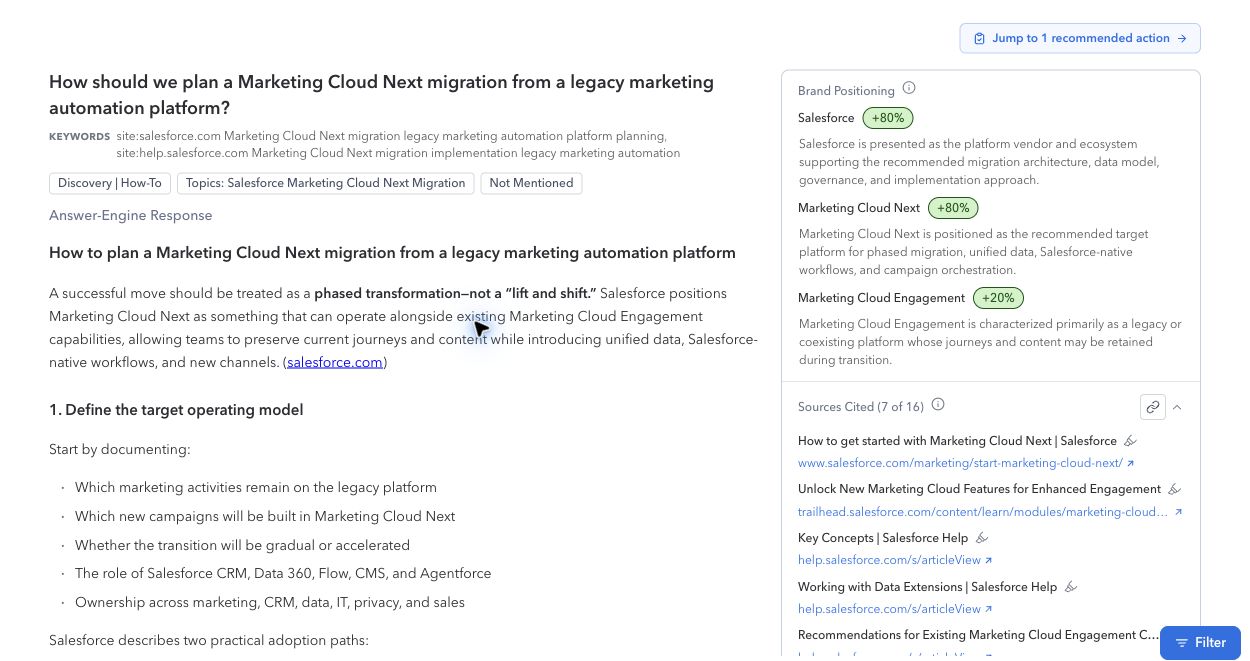
That is a useful editorial brief. We can review whether our own content answers migration-planning questions clearly enough, with evidence of what we do and how we work. We can also check whether the question is one our target buyers would actually ask before treating it as a priority.
Sources: see which pages are shaping the answer
Sources groups pages that Palmata assesses as helping or hurting the brand’s position, and lets you trace them back to the prompts. It also distinguishes pages that were cited from those merely considered.
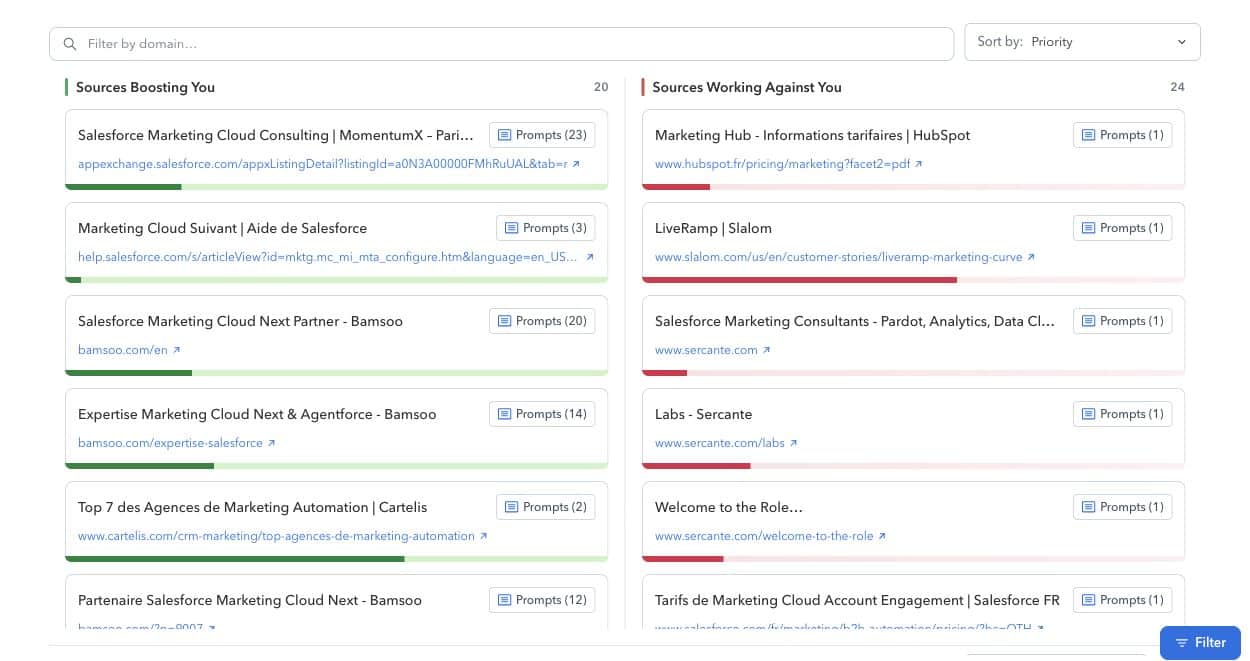
In the Bamsoo report, our English homepage and Salesforce expertise page appear among the helpful sources. The opposing column includes competitor service pages, a customer story and pricing information.
“Working against you” deserves careful reading: it is Palmata’s classification of the page’s effect in this audit. It does not mean the publisher is attacking your business or that its content is wrong.
For a marketer, this view helps decide where the work belongs. Some gaps call for clearer owned content. Others may require better customer evidence, an accurate directory listing or a stronger third-party reference. Open the related answer before deciding.
Actions: turn the findings into a content backlog
Our report contains five updates to existing content, eight new-content recommendations and three third-party actions. The documented action categories also include countering narratives and refreshing content. Actions can be sorted by effort or simulated impact.
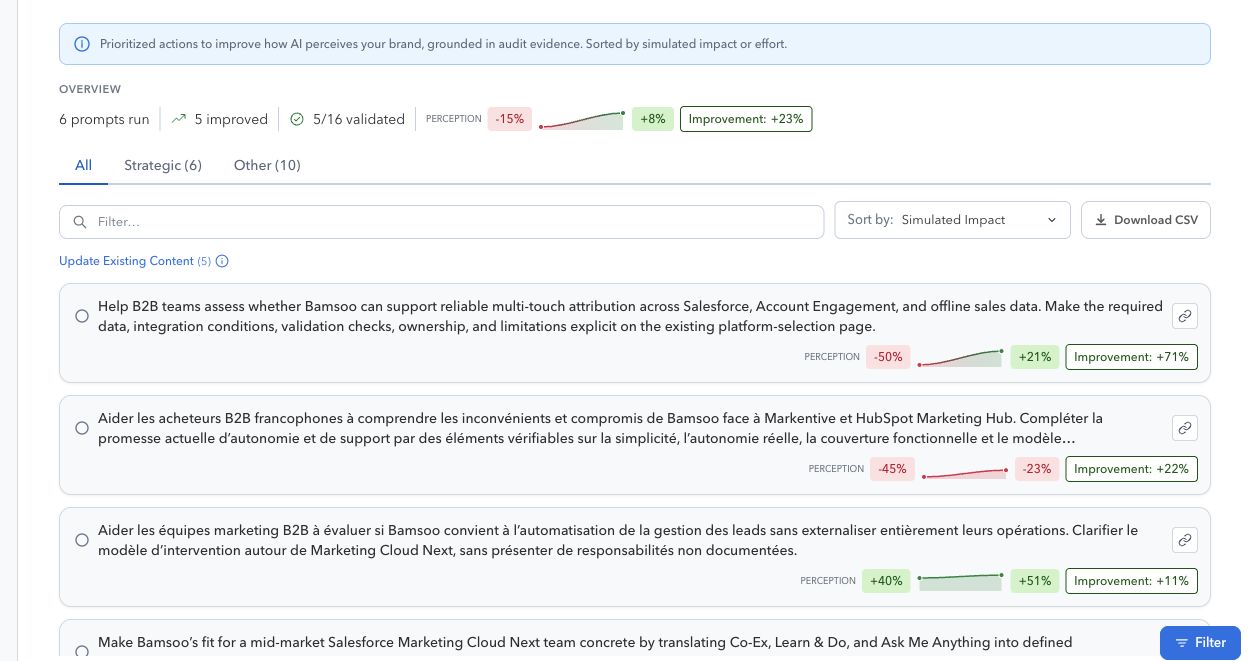
One recommendation proposes a migration-planning resource covering coexistence, data preservation and implementation risk. Another targets an existing platform-selection page: add a factual FAQ about multi-touch attribution, including required data, integrations, validation and responsibility boundaries.
That level of specificity is useful. A content owner can inspect the existing page, check the proposed evidence and decide what to change.
There is also a detail worth keeping in view: the overview shows 5/16 validated, with six prompts run and five improved. I would not describe all 16 recommendations in this report as successfully tested.
Simulations: inspect a proposed change before publishing
Opening the attribution action brings up a workspace with the rationale and affected prompts on the left, and proposed page edits on the right. In this example, the predicted perception moves from −50% to +21% for the affected prompt: a 71-percentage-point change, displayed by Palmata as “+71%”.
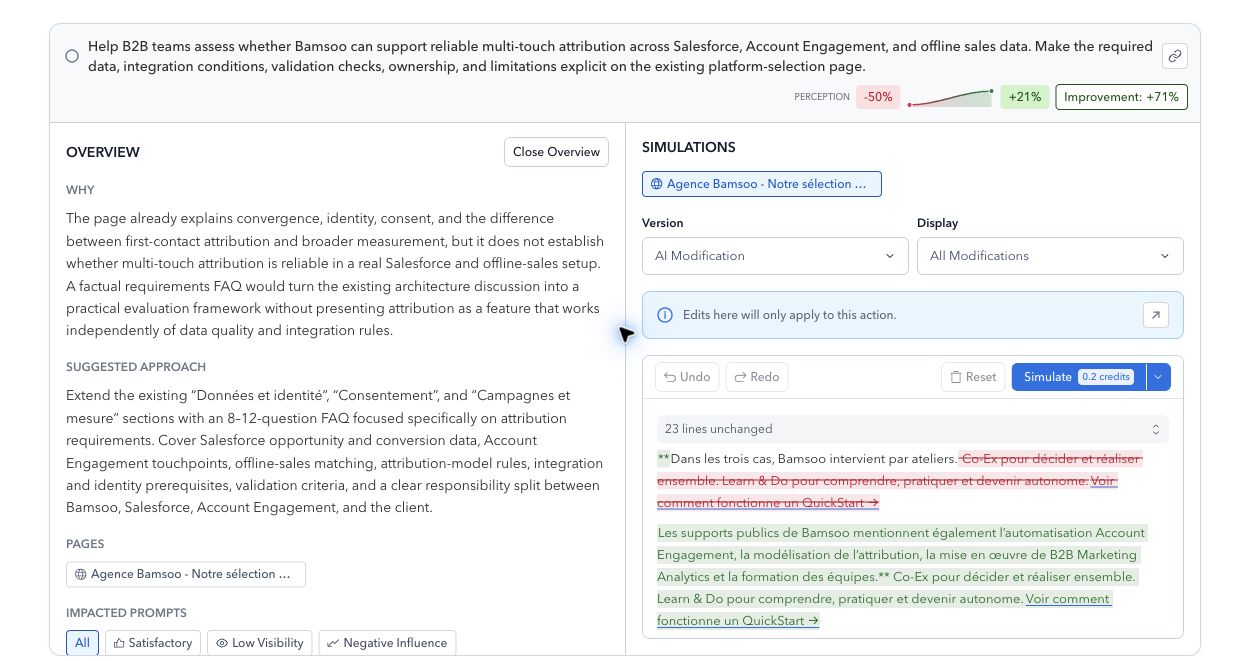
Palmata lets you revise the proposal, save a draft or run a new simulation. The button in our workspace shows a cost of 0.2 credits. I reviewed the existing result here; I did not run a new simulation or publish the edits.
The benefit is a way to prioritize and refine content before investing in publication. The forecast still needs a real-world check: Palmata’s documentation explicitly says simulations are not guarantees. Review the facts and wording, publish through your normal process, then use a later audit to see what changed.
Strategic Analysis: make the findings useful to the team
The final view turns the report into a written assessment with links back to its evidence. This is useful when a colleague needs to understand the proposed priorities without exploring every prompt.
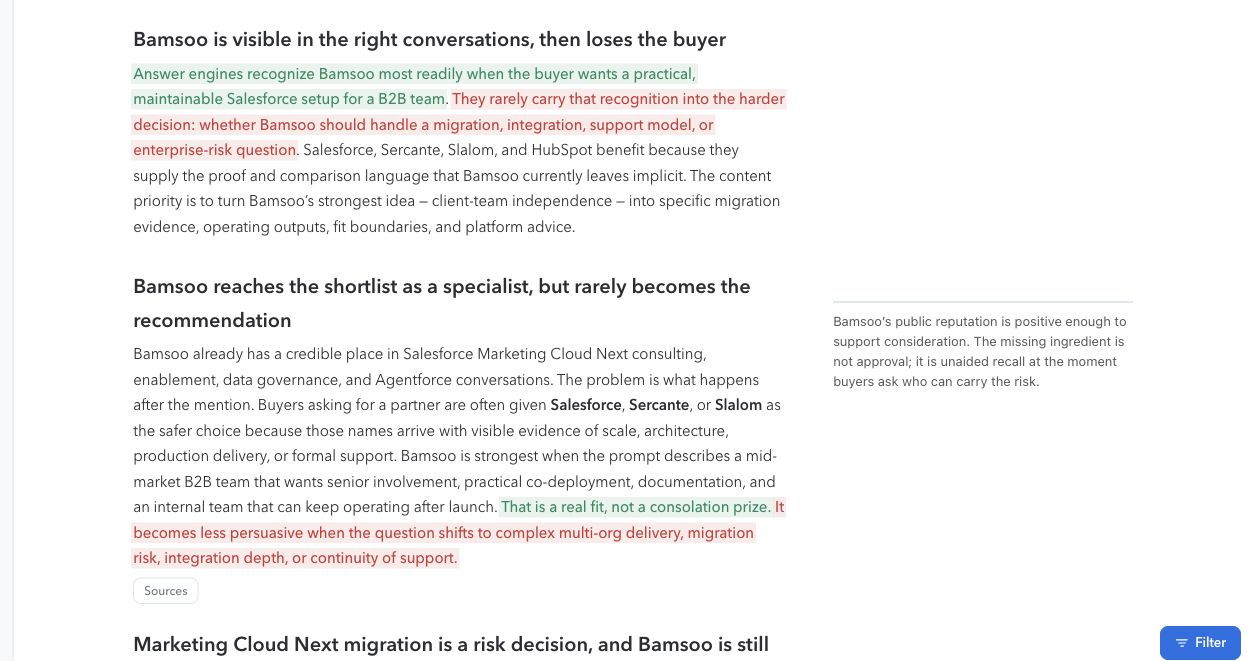
Palmata’s interpretation is that Bamsoo’s practical, client-enabling approach is visible, while buyers need more explicit proof around delivery, migration and support. I would treat that as a working hypothesis to check against the underlying answers and our commercial experience.
It gives marketing and delivery teams something concrete to discuss: which project examples, handover outputs and scope boundaries can we genuinely demonstrate?
Keep the loop going
The documentation describes comparing two report versions and viewing trends across three or more. Reusing an audit plan helps keep topics consistent. We have one run in this walkthrough, so there is no measured before-and-after result to claim yet.
Palmata also documents an MCP connection for reading reports from a compatible AI assistant. Its current documented access is read-only. Reading the assessment in an assistant and publishing changes to a CMS are separate capabilities; this walkthrough did not test a publishing integration, but as the website was built through a WordPress MCP server, propagating changes becomes easily actionable.
What I would do first
Start with one topic that matters commercially. Read a few of its prompts, check the sources and choose one content action you can substantiate. Give it an owner, improve the page and compare a later report using consistent settings.
For Bamsoo, the migration-planning gap is a sensible candidate: the topic matters to our work, the missing answer is visible, and the report connects it to a specific content recommendation.
What I find useful about Palmata is that it gives us a path from an AI-generated answer to work we can actually review and deliver. The marketer still decides which buyers matter, which claims are true and what deserves publication.
Try the Palmata Dreamforce signup, open your first report, and follow one important question all the way through to its sources and suggested action.
That is a practical place to start with AEO.