
Flow is now the orchestrator for Marketing Automation operations. Journeys are one piece of the puzzle it coordinates.
Executive summary: A hotel guest does a self-check in in the middle of the night. Tired after a long flight, they want a bottle of water and a quick snack before bed. Within seconds their phone vibrates with a personalized email that greets them by name, references the hotel and the hour and suggests a 24 hour corner shop and the deli that are still open at this hour. In the same second the reception’s Slack channel lights up with a reminder that a guest has arrived and a preview of what the guest just received. One transaction sets up a seamless chain of events across Salesforce Core, Data 360, Agentforce, Marketing Cloud and Slack. Elements included:
- Search Index
- Retriever
- Two Prompt Templates
- One Flow
- One MCE Journey
- One Slack Message
Only code involved is AMPscript in the MCE email.
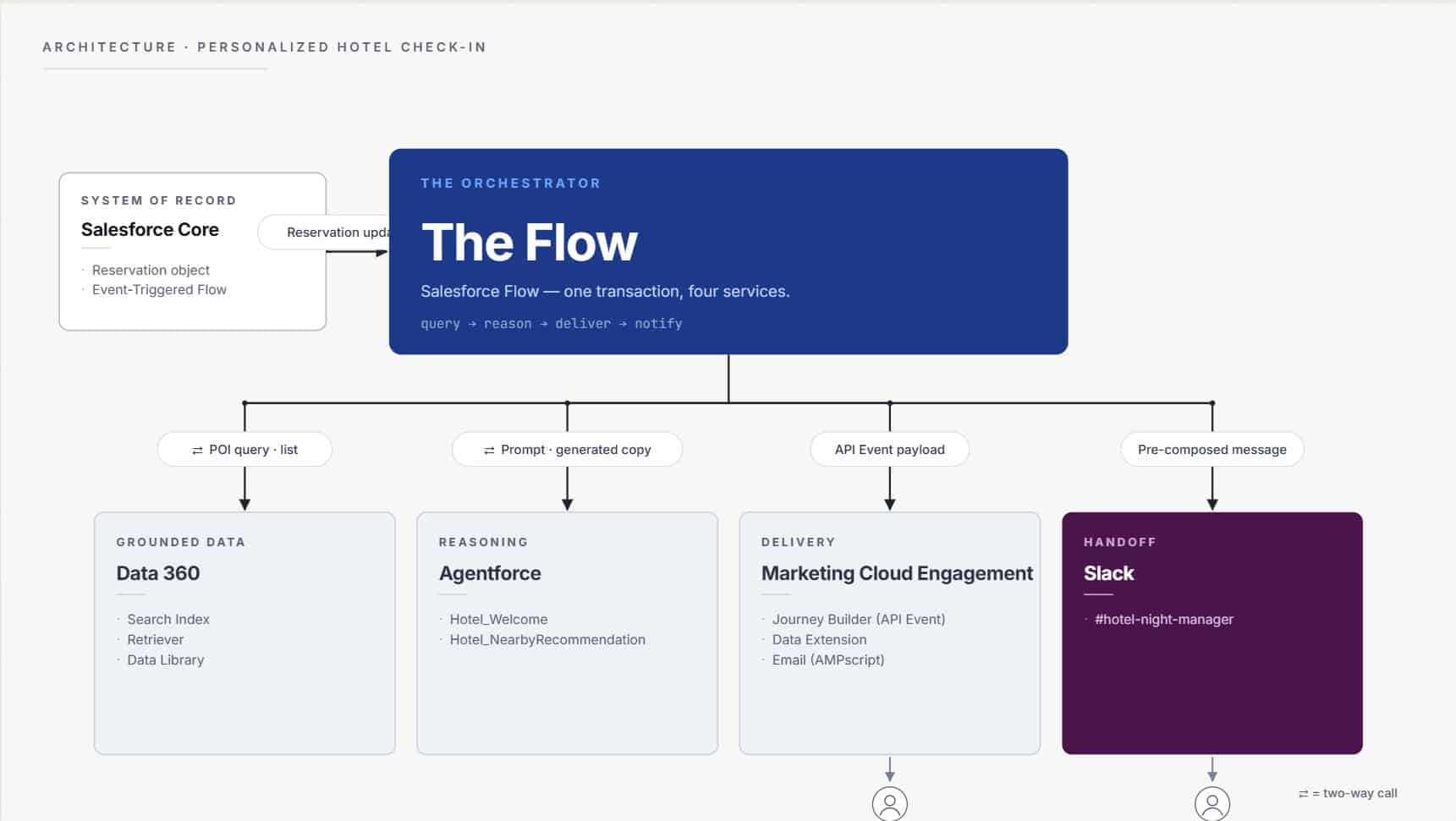
What changes when Flow is the orchestrator
When Flow becomes the orchestrator, four major things move up a layer.
Entry logic is resolved before the journey hears about it. Who qualifies, when they qualify and under what conditions is decided upstream. The journey receives a fully formed contact and a fully formed payload, not a messy hypothesis to resolve at send time.
Data assembly sits in Flow. The payload is built from any object in Core, any DMO in Data 360 or any other record lookup Flow can reach. Nothing is looked up inside the journey. Nothing is personalized from a data extension join at send time. The row is ready before the journey starts and contains all the necessary information.
Cross-cloud work plugs in as first-class actions. Agentforce Prompt Templates, Slack actions, Apex, Platform Events and REST callouts are all complementary to the Send to Journey action. The journey itself does not need to know they happened or that they exist in the same Flow. It just sends the messages it’s told to send.
A customer journey and its operational side effects share one transaction. The internal Slack alert rides the same Flow as the MCE journey on the same data, at the same moment, under the same audit trail. What used to be a separate integration becomes a sibling step in the same flow.
The journey is no longer asked to do everything and be responsible for things it shouldn’t be. It is asked to do the one thing that it does very well: deliver the messages on their chosen cadence and channel.
The hotel check-in is just a small example, but I chose it because it was easy to highlight the differences in orchestration with it. The journey in Marketing Cloud Engagement is just one paragraph of the bigger customer engagement configuration. Everything else happens one layer up.
The build: Two Prompt Templates, one Flow, one Journey
The hotel check-in is a greenfield demo so I had to build the data model from scratch. In a real project you inherit most of it or at least are not able to modify it to your liking. Before we go further into the build, let’s take a moment to look at the data model. There are assumptions made and corners cut here, but this part of the build took by far the most time, well over 50%. Data design is the most time-consuming part in real projects too depending a bit where you start from.
The data model assumption
Four objects carry the whole story.
- Contact has the information about the guest who checked in.
- Reservation has the information about their reservation and check-in details.
- Hotel has the shared information that applies across all hotels. Referenced by Reservation.
- NearbyPOI has all the information about the services located in the vicinity of all the hotels.
NearbyPOI holds a lot of data but the critical ones are the two structured fields (Category & OpenUntil) and one unstructured field (Notes). The structured data drives the deterministic filters inside the Flow for retrieval so that only venues whose OpenUntil is later than the check-in hour are fetched. The venues that shouldn’t be in the personalization never reach the LLM. Notes is deliberately a messy free text field. Opening quirks, vibe, descriptions, what you would tell a friend about it etc. It exists only to give the LLM context and material to reason over.
The split is intentional for a few reasons. Structured fields set boundaries for the retrieval, unstructured feeds the reasoning. Neither field knows about the other and neither tool is asked to do the other one’s job. It is important to understand that while all the hype is around LLMs and GenAI, there is still room for deterministic actions and knowing what goes where is crucial.
Designing this from scratch took by far the most time in the entire build. This is also where the majority of the time will be spent even if all the objects and DMOs already exist. The data model is the heart of any data-driven customer engagement and sets the course for everything downstream. Don’t cut corners here.
The trigger
Everything starts with a check-in timestamp being inserted into a Reservation record in Salesforce. Guest, hotel and nearby services are already linked to that record. Nothing special, same kind of setup that applies to many industries.
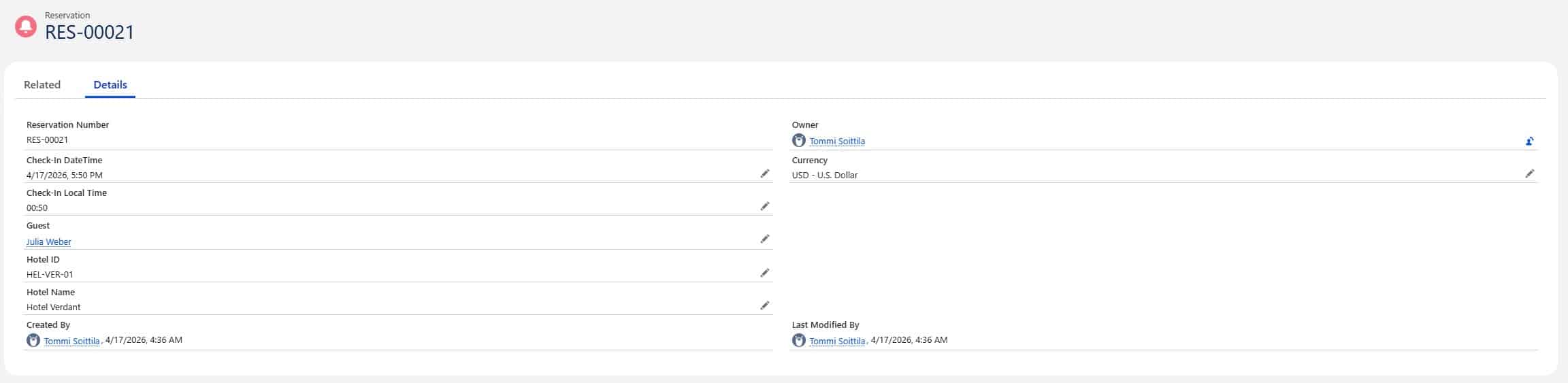
This triggers an Automation Event-Triggered Flow in real time. Everything downstream now reacts to this same record.
No segmentation. No schedules. No file drops. No manual work.
The orchestration Flow in eight elements
The orchestration Flow is actually very simple. Eight elements end-to-end, each with a single, clear job.
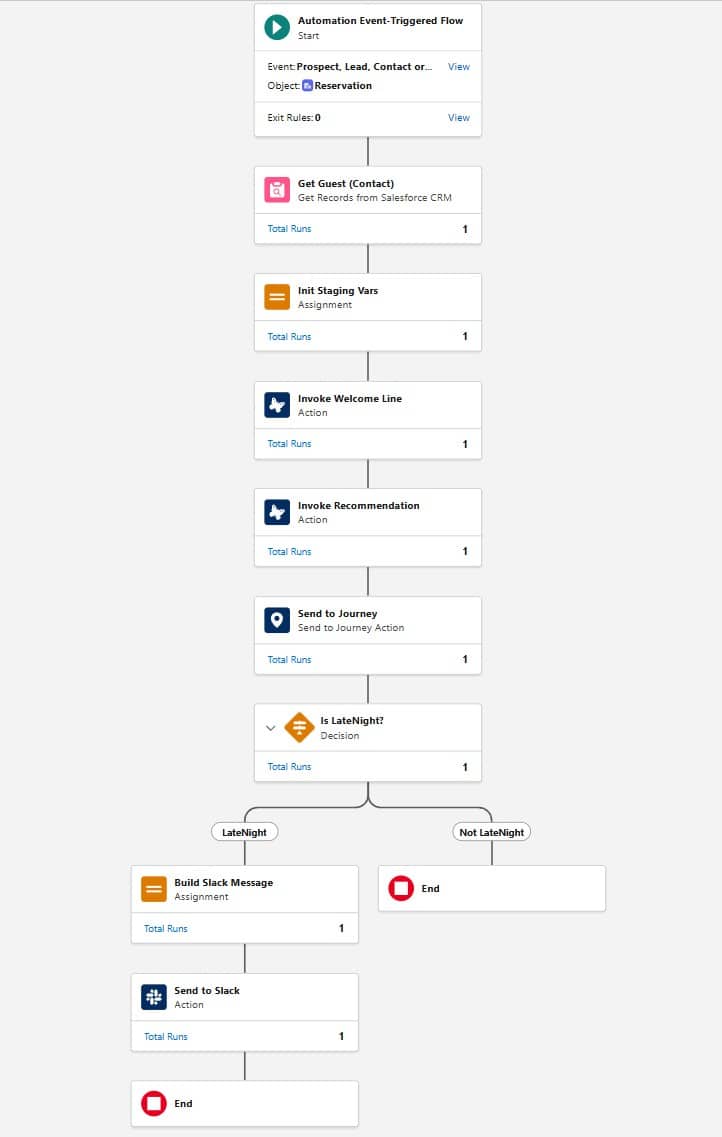
- Get Guest looks up the Contact information from the Reservation’s Guest lookup.
- Init Staging classifies the check-in time into Morning, Day, Evening or LateNight and assembles the payload for Marketing Cloud.
- Invoke Welcome calls the first Prompt Template and stores the generated welcome line.
- Invoke Recommendation calls the second Prompt Template and stores the generated recommendation paragraph.
- Send to Journey fires the MCE journey with the full payload.
- Decide LateNight branches based on the category we built earlier.
- Build Slack Message composes the message for the night manager.
- Send to Slack posts it to the reception channel.
No Apex. No middleware. No subflows. The same Flow that got triggered by the check-in takes care of everything all the way to the Slack message.
The temptation to over-engineer the Flow is always there, but often simple is beautiful.
Two Prompt Templates grounded in Data 360
Two Prompt Templates do all the reasoning in this journey and provide all the content for the email.
The welcome template takes the guest’s first name, the hotel, the city and the local time and returns a single sentence that greets the guest in a way that fits the hour. That’s it.
The recommendation template takes a pre-filtered list of nearby venues and a time-of-day signal, and returns a two-sentence paragraph that reads like a concierge note. This wouldn’t be possible without indexing of the unstructured data. The Retriever behind the template only ever hands over venues that are actually open at the check-in hour (the filter we covered in the data model section). The LLM reasons over a short, curated list. It doesn’t know about the city or the opening hours so that we can control the risk of it getting confused and we preserve scalability.
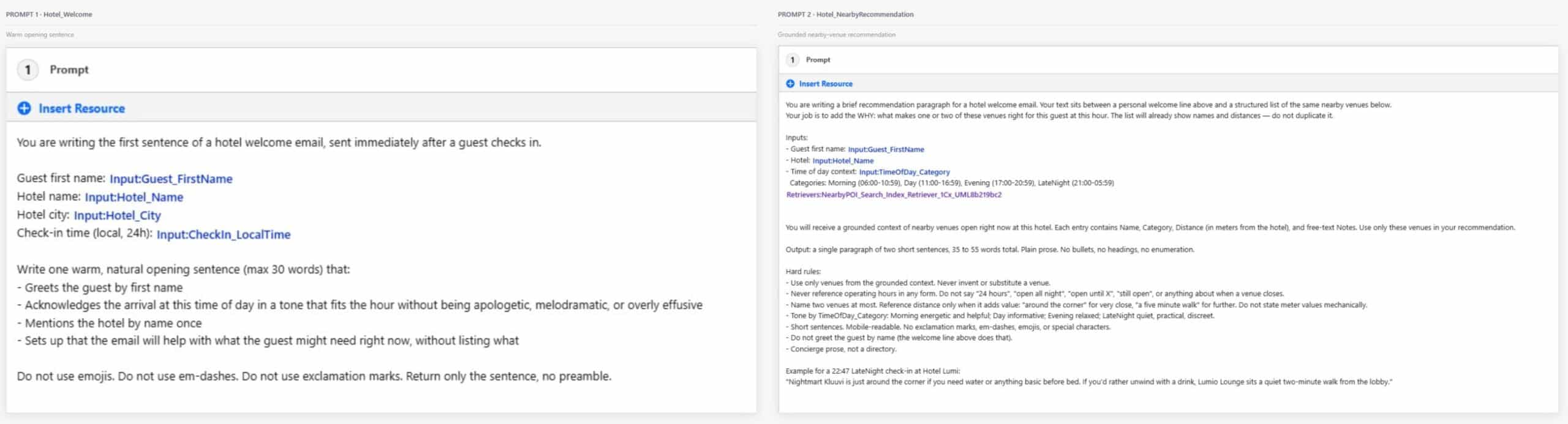
The prompts themselves are small, just a few paragraphs each. Narrow context, well-defined output, fast turnaround. Each template does its job in a fraction of a second. In a real case you would keep on fine-tuning the prompts and cover a wide variety of test scenarios before going live.
The LLM sits at the end of a short, auditable pipeline, not at the start of a wide one
Journey as the sending engine
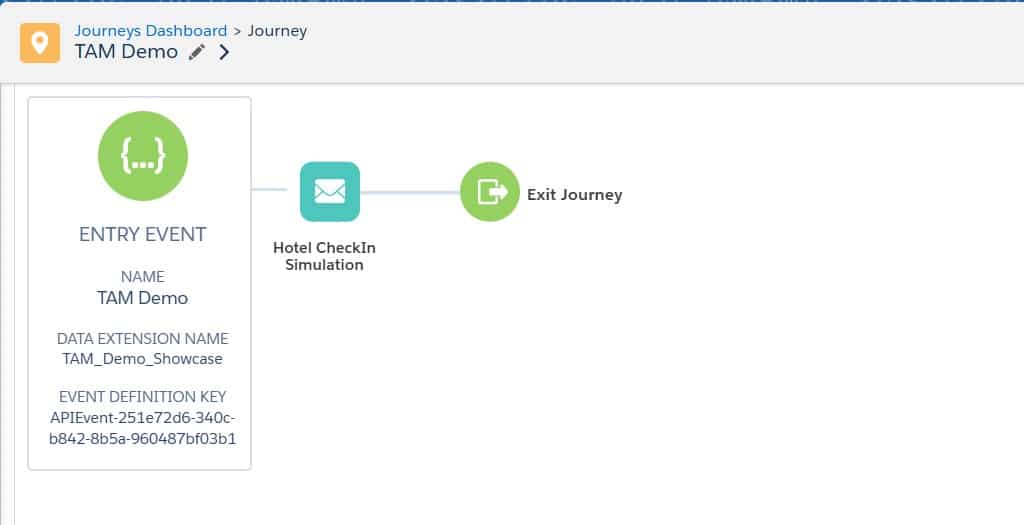
Marketing Cloud Engagement’s Journey Builder hosts one journey, one entry event and one email. Very simple.
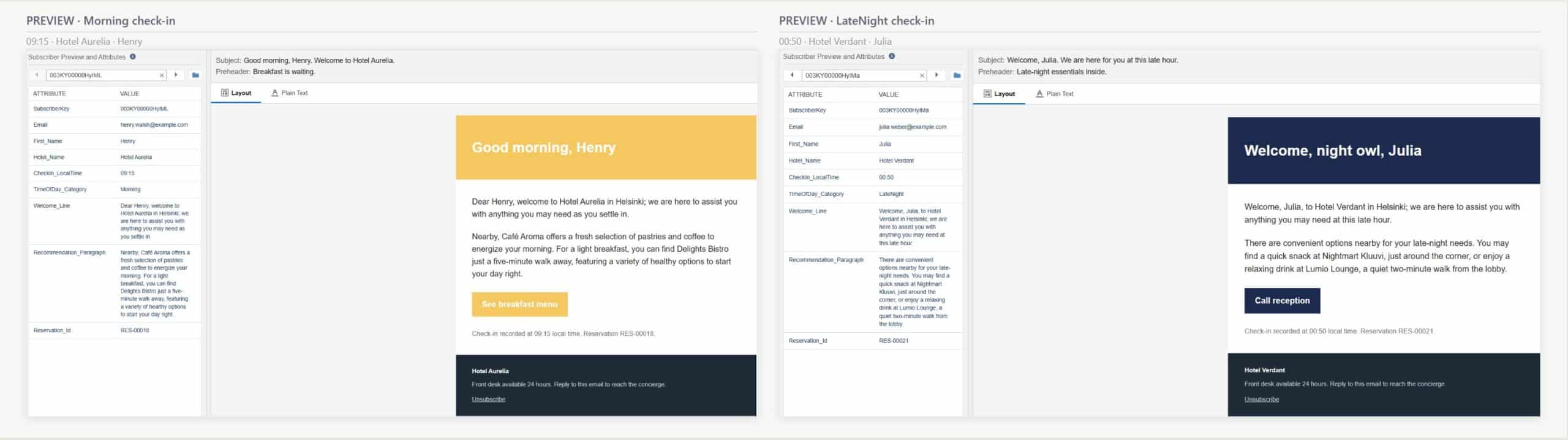
One email, four personalized variations. With this setup you could have however many variants you want without any additional work.
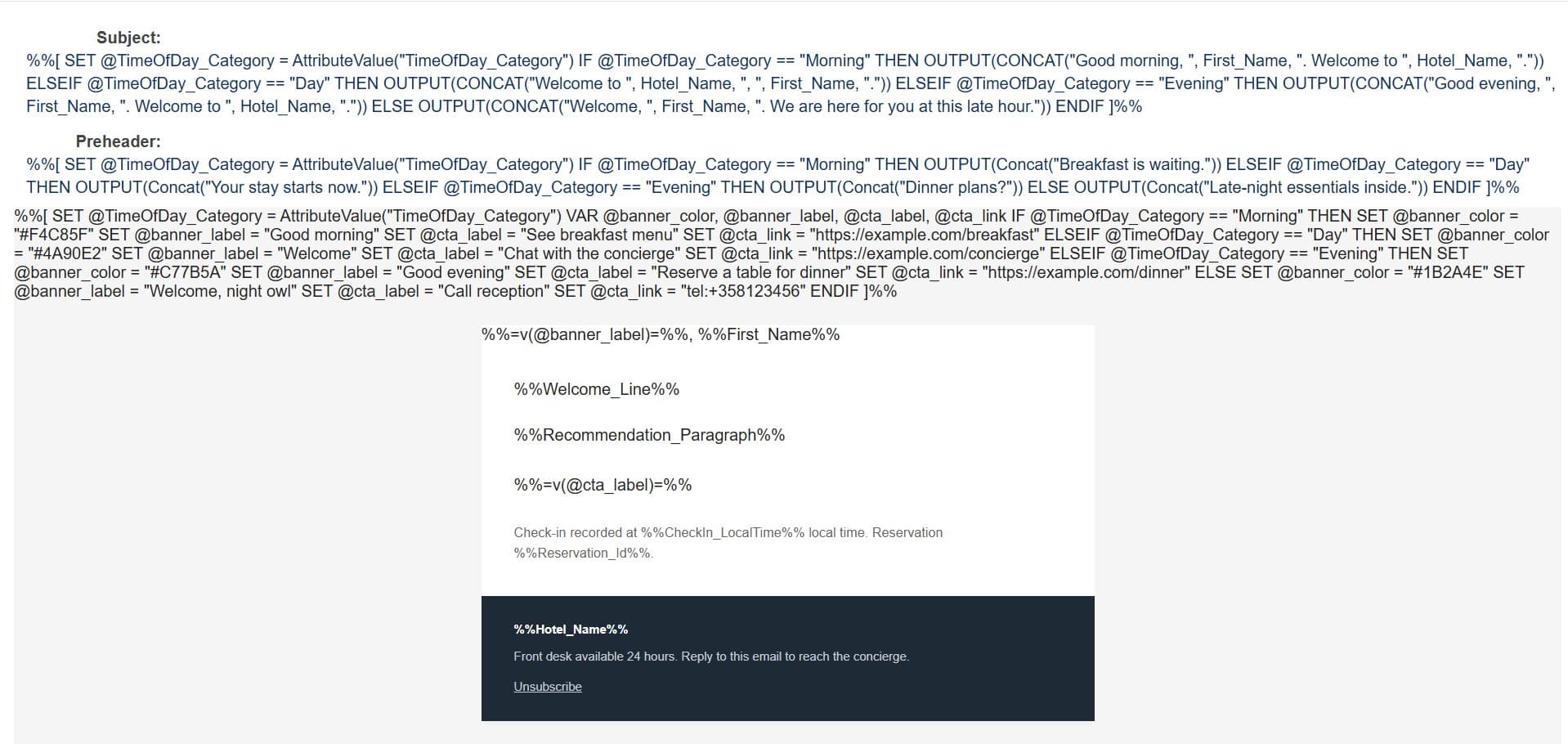
AMPscript at the top of the HTML reads the TimeOfDay_Category value already on the Data Extension row and sets the banner color, the banner greeting, the CTA label and the CTA destination accordingly. The welcome line and the recommendation paragraph drop in verbatim from the Prompt Template outputs, since those were already written for the right tone upstream. Remember, each customer gets their own personalized content generated individually for them, not for the entire segment.
The journey canvas has now become a target of orchestration, not the orchestrator itself.
The operational handoff to Slack
The same Flow that sent the guest’s email also posts to Slack.
After the Send to Journey action the Flow splits the LateNight check-ins to their own branch and a Slack action sends a message into the hotel’s #hotel-night-manager channel. The message is pre-composed inside the Flow: alert header, guest name, hotel and city, check-in time, reservation ID, the same welcome line the guest just received, the same recommendation paragraph and a next-step line asking the receptionist to stop by within 30 minutes. You can configure this message to be whatever you want.
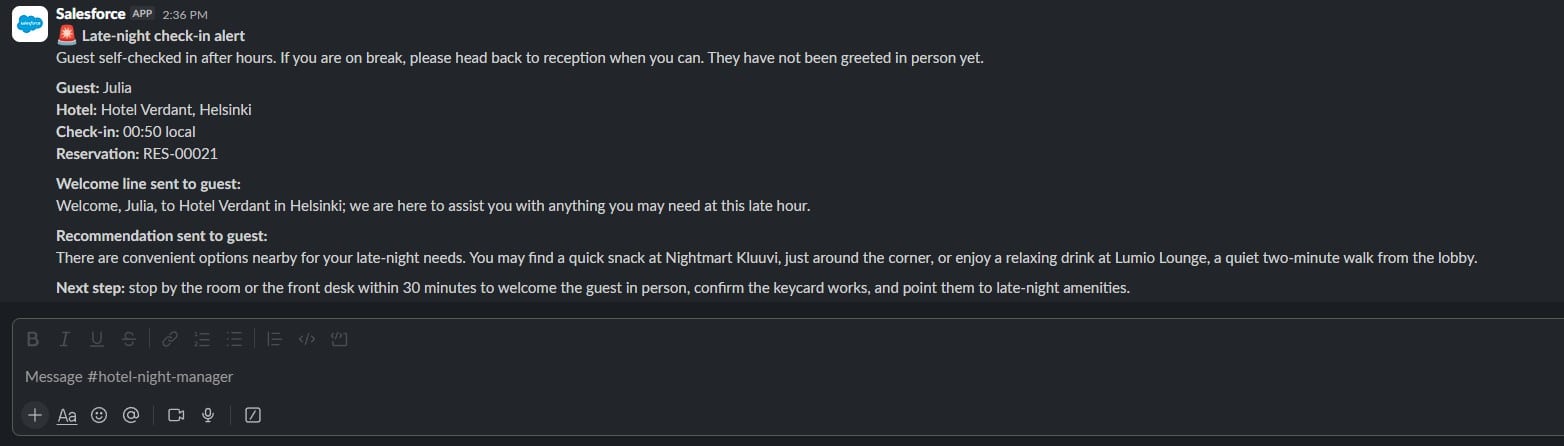
No Apex, no middleware or routing to other tools for reminders. Slack is a first-class Flow action just like Send to Journey or an Agentforce Prompt Template call.
Since all of this happens in real time, the night manager sees the alert at the same moment the guest’s phone vibrates with the email.
When you use Flow as the orchestrator, customer engagement, business processes and internal alerts originate from the same place. No need to trigger separate events to external systems or build any custom processes.
A marketing process and an operational handoff are siblings in the same transaction, not cousins in different systems.
Why this build stayed small
Every element in this build had its natural home and it may take some time to admit that Marketing Cloud shouldn’t be forcibly used for things that don’t need to be there.
Classifying a check-in timestamp into Morning, Day, Evening or LateNight is essentially a math problem with a single correct answer and in my demo case I wanted these decisions to be treated the same way every single time. Branching the LateNight path to Slack is the same kind of decision and no LLM should touch either one.
Grounded reasoning belongs in Prompt Templates. Writing a welcome line in a tone that fits the hour or turning a messy free-text Notes field into a concierge recommendation is a context-dependant judgement task. There is no deterministic rule that writes good copy and even if you tried a rule-based approach here you would have to build hundreds of template variants and rulesets. The LLM only ever gets to reason over data that has already been filtered and grounded upstream.
Cadence and delivery happen in Marketing Cloud Engagement. If your use case is to send one email then you don’t really need a journey for it but the journey lays the groundwork for scalability.
A night manager does not need an email. They operate in Slack so they need a message in the channel they already live in, at the exact moment the event happens.
You need to broaden your view to notice which tools are best suited for which job and especially in MCE+ context it often means going outside of Marketing Cloud Engagement, even if it might feel uncomfortable in the beginning.
The hotel is the example. The architecture is the product.
The hotel case here is just a fictional demo. The core principles of the setup apply to any post-transaction moment in any industry.
Swap the hotel for an airline. A flight gets delayed by +2 hours so you send the passenger a grounded message to tell them which restaurants at the airport are still open and where they are located.
Swap the airline for a SaaS trial sign-up. A prospect signs up for a trial and they get a personalized onboarding email grounded in what they selected and the AE gets a Slack ping with context before they reach out.
The list goes on. You can introduce more channels, more deterministic parts, more everything. This same setup works for a wide variety of things. The prompts, content and the data models change, but the architecture stays the same.
The hotel is just an example. The architecture is the product.
Why the next additions are trivial
The journey in my demo is intentionally extremely simple. The demo is about the orchestration between Flow and MCE, not journey complexity. A journey with multiple channels, waits and decision splits is built exactly the same way. Want to add an SMS or Push notification to late night arrivals? A landing page with a breakfast menu for early mornings? Bus or train schedules for checkouts? Each of these additions becomes trivial once the foundation is in place. They aren’t new projects. The setup that took time to build is already there.
Where the time actually went
I figured it might be interesting to share a little bit of what a project like this would look like and where the time goes:
- Data foundation: 60 %
- Flow orchestration: 20 %
- Prompt Templates: 10 %
- MCE: 5 %
- Slack: 5 %
Notice that more than half the build is data. In my case the proportions might be slightly skewed since I had to also design the Core data model that would already be in place in an existing business environment.
Either way an interesting takeaway from this is that more than half of the work here requires skills that typical marketers might not have. However this is the part of the build that needs to be absolutely correct. Everything downstream assumes it works and relies on the inputs being correct. This part usually isn’t visible in the live demos or slides you are shown.
Although this could be categorized as an Agentforce use case it is important to note that the AI part took only one tenth of the workload.
Closing thoughts
Although the article is built around the hotel, the real gold mine is the architecture.
Find the post-transaction moment in your business that happens too fast for batch segmentation, too often for a human to handle one-by-one and has too much variation for a deterministic rule-based approach. That is your first Agentic use case.
Thank you to The Agentic Marketer community for inviting me to share my take on this.
You can find me on LinkedIn and the TAM Slack workspace if you are interested in sharing thoughts and ideas.